Using Template Screens
A template screen is a screen for which the data from multiple facilities is displayed in the same format.
A template screen requires that the point identifier of each object use only the UDC, and that the Site.Service and FACILITY IDs are passed to the object from TheView. This is because of the point identification properties, only TheView’s [SiteService] and [Facility] properties can be set dynamically in Run mode.
|
Template Screen |
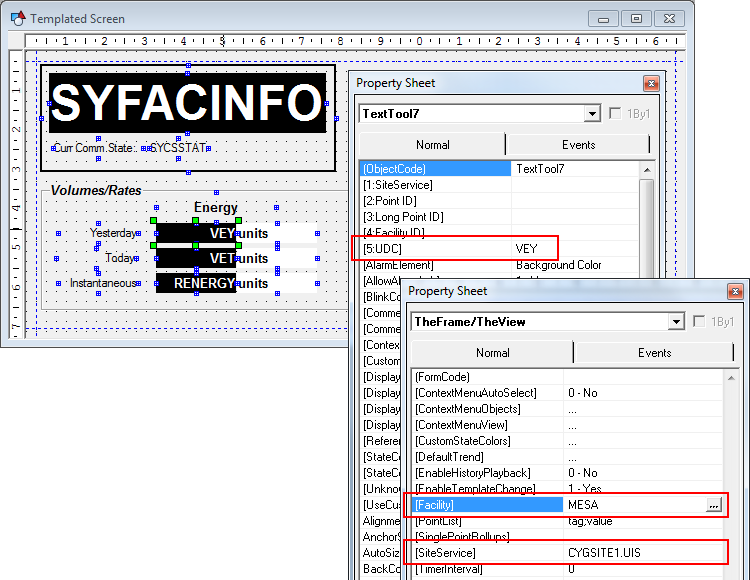
All of the tools that have a Primary Point can be used in a template screen, and any other tools that have Site.Service and FACILITY identification properties, including the Trend Tool, the Group Grid Tool, DDS Editor Button, and Command Tools.
HyperLinks are used in a template environment to reset the Site.Service and FACILITY ID properties of TheView. Tools used commonly for this purpose include the Button Tool (set as a HyperLink button), the Facility Navigation Bar, the Group Navigation Bar, and a ComboBox.
Unknown Tag
In a templated environment, not all facilities may have points for all of the UDCs on the screen. In such cases, the property [UnknownTag] is useful. This property specifies what happens to the object when a primary point cannot be found in the system. Options are None and Hide.
- When set to None, the object is displayed with an "unknown" status, and its color is set to the Unreliable color (meaning that the value is not trustworthy)., but its color is set to the Unreliable color.
- When set to Hide, the object is not shown at all.

